Latest Updates
Nov 3, 2026
Ask About Your Data
For companies using our AI features, like AI Ticket Scan and AI-Based Reconciliation, admins now have a new box at the top of Reports & Forms. Type a question the way you'd say it, like "how many tons did we deliver last week, by product?" or "which logging crews moved the most loads in August?", and TRACT runs the report and gives you the answer.
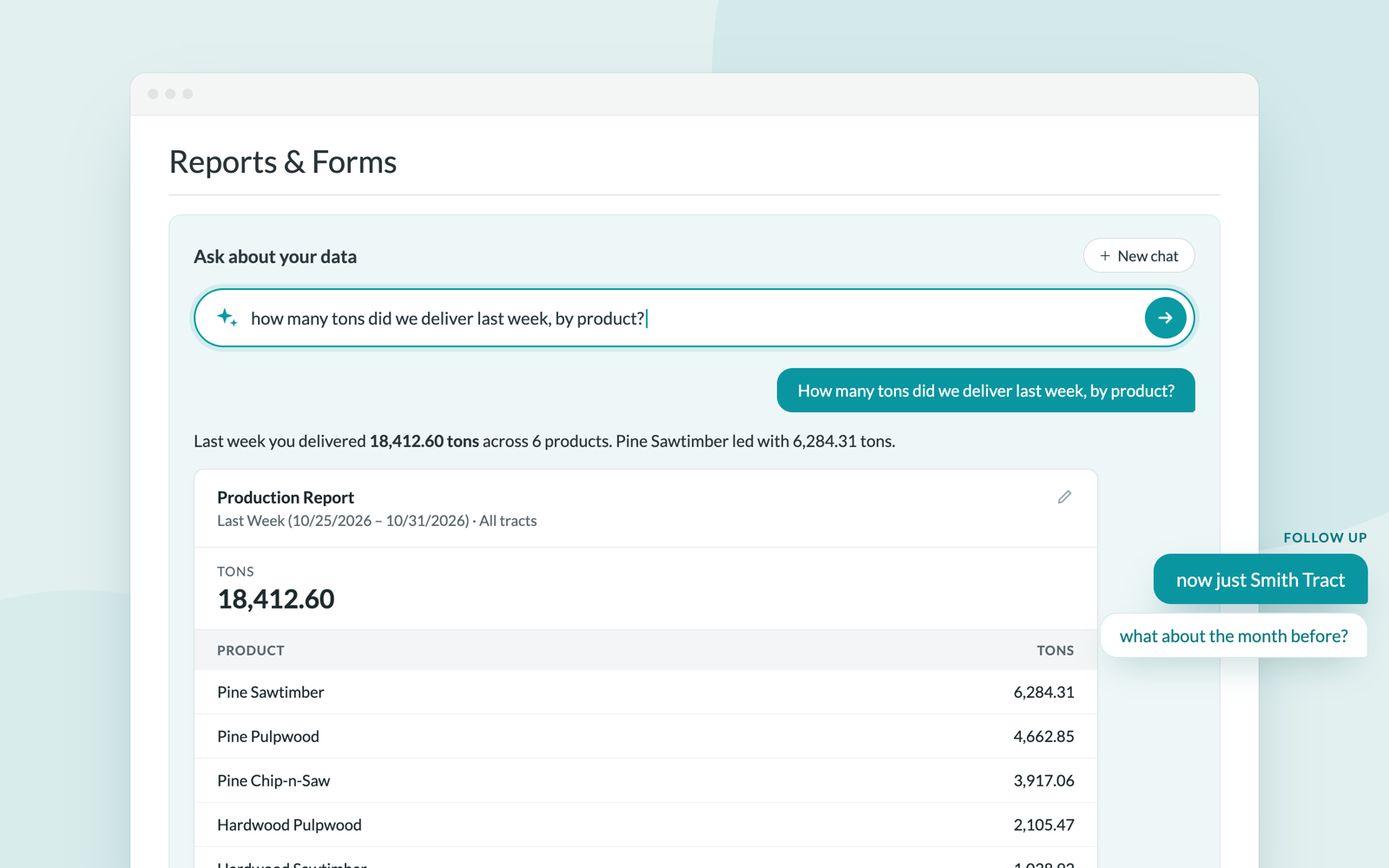
You get a short answer plus a card showing the totals, the top rows, and exactly which tract and dates were used. From there, Open full report shows every row in the real Production Report, and Save as report keeps it in your Custom Reports under whatever name you like, which makes it the quickest way to build a custom report. Both open in a new tab, so your conversation is still there when you come back.
Follow-ups work, so you can say "now just Smith Tract" or "what about the month before" without starting over. Your newest question always sits right under the ask box. New chat clears the screen and keeps your earlier chats one click away.
For now it answers production questions: tons, loads, income, expenses and profit, broken down by job, product, crew, trucker, mill, forester or landowner. That profit covers delivered load tickets only, so it's production profit rather than your full P&L. The assistant says so whenever it quotes money, and the Profit and Loss report still has the whole picture. It only sees the jobs and reports your login can already access, and if it can't answer something it says so rather than guessing. More reports are coming.
Oct 29, 2026
Auto Adjustments: Show Active or Inactive Rules
Above the Auto Adjustments list, next to the number of entries, click All, Active or Inactive to show only those rules. Each one shows how many rules it contains, and they work together with the search box: search for "fuel" and click Inactive to see only the inactive fuel rules.
Auto Adjustments: Exclude Jobs, Mills and Products
Auto adjustment rules can now exclude jobs, mills and products, not just include them. When a rule should apply almost everywhere, set it up once with the exceptions, such as "every job except the sawmill jobs" or "every destination except our own yard". New jobs, mills and products are then covered automatically, without editing the rule. Exclusions show on the rule list as "not job", "not mill" and "not product" tags.
Also new:
- See the transactions a rule created. The Transactions page has a new Created by auto adjustment filter (for admins) that lists exactly the transactions a rule generated, and combines with the other filters. Each rule's ⋯ menu on the Auto Adjustments tab has a Transactions link that opens this list across all dates. Use it to review what a rule did, for example after fixing a rule that was set up too broadly.
- Account categories match the Chart of Accounts. The account category condition uses the same category names as the Chart of Accounts, with a link to see which accounts are in the category.
- Edit, Copy and Delete are now in each rule's ⋯ menu.
A Clearer Chart of Accounts
The Chart of Accounts page now shows how accounts and categories fit together. Every account belongs to a category, and each category comes with a built-in default account. Your own accounts are now listed right under their category's default, instead of in a separate table.
Improvements:
- One list, grouped by category. Income, expense and balance accounts each get their own table. Every category starts with its default account, followed by the accounts your company added, marked Default and Company.
- Search and filter. Search accounts by name, or narrow the list to one category or to income, expense or balance accounts.
- Add an account to a category in one click. + Add account next to a category opens the new account form with that category already selected.
- See how each account appears on statements: as its own line (with its statement description) or grouped.
- Check what a rule covers. An auto adjustment rule that matches an account category links straight to that category here, highlighting exactly which accounts the rule applies to.
Oct 26, 2026
Pause Cash Advance Withholding
You can now give a vendor a cash advance without taking it out of their statements right away. Check Pause cash advance withholding when editing a job, and statements on that job stop withholding cash advances until you uncheck it.
- The advance still counts as Cash Advance Out on the dashboard and in the Jobs report.
- Statements still show it in Cash Advance Balance Forward and Outstanding, so the vendor can see what they owe, and mark the withholding line "(paused)".
- The pause covers every vendor's cash advances on that job.
- Uncheck the box when you're ready to collect, and the next statement withholds as usual.
Oct 23, 2026
Job Products: Sorting That Sticks, Group By, and Site Tags
Sorting a job's Products tab now stays put. Sort the list the way you like, click Add Product, save, and you come right back to the same list, arranged the same way, with your new product in its place. No more re-sorting after every product on jobs with dozens of them.
- Sort by any column. Click a heading such as Product, Destination, Miles or Revenue/Unit to sort, and click again to reverse. Blank values always sit at the bottom.
- Group by. Split the list into sections by Product, Destination, Origin, or Origin/Destination (Woods to Site, Woods to Mill, Site to Site, Site to Mill, the same sections as the mobile app). Your column sort still applies inside each group. Choose None for a single list.
- Site tags. Inventory sites get a small SITE tag in the Origin and Destination columns, so you can tell a site from a mill at a glance.
- Bookmarkable. Your sort, grouping and search are saved in the page address, so you can bookmark the list or share the link.
- Live updates. Keep the products list open in one window while you add or edit products in another, and the list updates on its own when you save. A coworker's edits won't rearrange your screen.
Oct 22, 2026
Production Report: Origin Site and Destination Site Columns
Loads delivered to or hauled from one of your internal sites no longer show a blank destination on the Production report. Origin Site and Destination Site are now available as columns, so you can see and group production by site just as you can by mill.
- Find both under Location & Geography in the column picker (the settings icon).
- The existing Site Origin and Site Destination filters still work alongside the new columns.
- The columns appear in the on-screen table, PDF, and spreadsheet export like any other column.
Oct 19, 2026
Mobile App: Rainfall, Spanish, and More (iOS 10.0 / Android 8.0)
A big update to the TRACT mobile app is now on the App Store and Google Play. Update to iOS 10.0 or Android 8.0 to get everything below.
Rainfall for every job
Rainfall is now in the app. Each job shows recent and upcoming rainfall measured at the job's own location, so you can see at a glance whether a tract is wet.
- Loaders: open a job and switch to the new Rainfall tab next to Dashboard, Loads, and Map.
- Truckers: the Rainfall tab on your home screen covers every job you haul for. Pick a job from the list, or tap its pin on the map to jump straight to it.
- The chart plots daily, total, and average rainfall in inches. Touch and hold any point to read the exact values for that day.
- Tap Info for a plain-language explanation of where the numbers come from and how today's forecast differs from measured rain.
- Tap Full Screen to see the chart in landscape. The chart also works in dark mode.
Español
TRACT now speaks Spanish. Switch between English and Spanish from the Profile screen, and the whole app updates immediately. Dates and times also follow your device's regional format.
Android catches up with iOS
- Truckers can scan QR codes. A scan button now sits in the trucker bottom bar, just as it does on iOS.
- Geofences on the loader map. The Map tab draws job geofences in yellow alongside tax parcels in teal, with a legend.
- Redesigned trucker home. The trip panel is now a drawer you can drag up for details or down to see the map.
Smaller improvements
- Profile warns you before switching companies if you still have uploads waiting to send, so nothing gets stranded.
- Signing in, resetting a password, deleting a load, and starting a trip no longer refuse to work when the app's internet check is uncertain. They try the request and show a clear error if it fails.
- Clearer error messages throughout, including when a load you're editing has been deleted on the server.
- iOS: the Profile and Field Visits screens have been rebuilt, which also fixes the navigation bar flicker on iOS 18. The app is ready for iOS 27.
Oct 14, 2026
Create Statements: Settle More Than 1,000 Tickets at Once
The Create Statements page still shows the oldest 1,000 tickets that match your filters, but you are no longer limited to settling 1,000 at a time. Check the box in the table header, then click Select all … tickets matching this filter, and the preview and statements cover every matching ticket, not just the ones on the page. You will be asked to confirm the ticket count before the statements are created.
Oct 7, 2026
Name Your Optional Ticket Options
Optional fields and optional transactions on a distribution can now have a name. Open the distribution's settings, choose Make Field Optional on Ticket, and enter a label such as "Own trailer". Ticket entry then shows that name instead of the account and vendor ("Own trailer - Overstreet Transport" rather than "Trucking Expense - Overstreet Transport"), and it appears on the distribution and in the product details on the job's Products tab.
Oct 6, 2026
Copy Distributions Between Jobs
You can now copy just the distributions from one job onto the products of another — handy for shared jobs, which arrive with products but no distributions. On a job's Products tab (or the Add Distributions step when accepting a shared job), click Copy Distributions From Another Job, pick one of your jobs, and every product without distributions is filled in from the matching product. For a product with no match — one that's new to you, say — choose which product to copy from right on the review screen, then adjust the rates.
Also new when copying products to another job:
- A review screen shows exactly what will happen to each product before anything is saved, and a summary afterwards shows what did.
- Merge distributions into products that already exist fills in products the other job already has instead of adding them a second time.
- You are warned before a copy would create a duplicate product.
Sep 16, 2026
Faster, Much Smaller Ticket Image Prints
Printing a large batch of ticket images used to produce an enormous PDF that took several minutes to build and sometimes failed to download at all.
Generating those PDFs is now a lot faster, and the files generated are much smaller.
Sep 10, 2026
Credit & Copy
Credit & Copy, a new option in the ticket's Actions menu, credits a load and creates a copy of the original in one click — no more crediting and copying as two separate steps.
The same action is now available for multiple loads at once too: check Credit & Copy Loads on the bulk edit screen to credit and copy every selected load in one pass.
Sep 9, 2026
Choose a Different Name and Address for Your Settlements
Vendor and landowner settlements no longer have to show your company's name at the top. Build a list of names and addresses under Letterheads, then set one as a vendor's default or pick one on any individual statement's edit page.
- Manage your list of letterheads (name + address, and optionally a logo) from the new Letterheads page.
- A letterhead's logo replaces your company logo at the top of statements that use it — and if it has no logo, no logo is shown, so your branding never appears on a statement printed under someone else's name.
- On a vendor, set a Default Letterhead so every new statement for them shows it automatically — no retyping each week.
- On any statement's edit page, pick Letterhead to switch between your company's name or any letterhead in your list — this works even for a one-off, without changing the vendor's default.
- The choice is saved with the statement, so reprinting an old statement always shows what was on it originally.
Sep 2, 2026
Auto Transaction Adjustments: "Ticket Net Tons" Now Means Tons Only
Auto Transaction Adjustment rules with the Ticket Net Tons unit source now only apply to tickets whose product is measured in tons. Tickets measured in board feet, MBF, or any other unit are skipped entirely, so a per-ton fuel surcharge no longer multiplies its rate by a board-foot count on sawmill or dry-kiln loads. This applies to existing rules as well as new ones, starting with the next time a ticket's transactions post or repost.
If you have a rule that should apply to every ticket regardless of unit, switch its unit source to the new Ticket Net Units option, which uses the ticket's net quantity in whatever unit the product is measured in.
Sep 1, 2026
Create Statements Handles Large Ticket Backlogs
When you filter by a vendor or job with a very large number of unsettled tickets, the Create Statements page now shows up to 1,000 tickets at a time, oldest first, rather than loading the entire backlog at once. If more tickets match your filters, a message on the page tells you so — settle the ones shown, or narrow the date range, to work through the rest.
Previously a single selection could cover many thousands of tickets, which made the page slow to load and produced statements that were themselves slow to generate and to open afterwards. Editing a statement with a large number of transactions is also noticeably faster now.
Aug 26, 2026
Security Tag Range Fix for Credits & Corrections
Fixed an issue where creating a credit or correction on a job with Enforce Security Tag Range turned on would incorrectly fail validation. Credit, correction, and re-entered tickets carry a suffix on their tag number (e.g. -CREDIT), which was being read as part of the tag and blocking the save even though the underlying tag number was within the defined range. Suffixed tags are now validated against their base number, so credits and corrections go through normally.
Aug 24, 2026
Ticket Status Stays Accurate After Reposting Transactions
Fixed an issue where a ticket's status (Delivered, Settled, Partial Settled) could go stale after its transactions were automatically reposted — for example, after a distribution was added, removed, or changed on the job product. The ticket's status now always reflects the actual state of its transactions once reposting finishes.
Aug 21, 2026
Quota Planning and Tracking (Beta)
Plan your week's loads mill by mill and crew by crew, then watch the real deliveries land against that plan. Quota is a new item in the main menu with two tabs — Planning, where you build the week, and Tracking, where you see how it's actually going.
Planning your week:
- Set a quota per mill. Add a row for each mill and harvest category you're hauling to this week, then choose how the quota works: a Weekly total you spread across the days, Weekly with Daily Cap to keep any single day from running away, or Daily Only to set each day on its own. Give a row a priority of Low, Med or High, and a custom name if the mill and category aren't descriptive enough on their own.
- Assign your crews. Add a column for each logging crew, pick a color so it's easy to pick out, and type the loads each crew is taking to each mill. Everything edits in place — no forms, no saving.
- See where you stand as you go. Totals add up across every row, day, and crew, and a green check appears the moment a row or a whole day is fully covered. Day tabs across the top show that check too, so you can see at a glance which days are done without opening each one.
- Two ways to read the week. Flip the week grid between Days columns to see the shape of the week, and Crews columns to see how the work is split across your crews.
- Start from last week. Copy a previous week's plan forward and adjust, instead of rebuilding it from scratch every Monday.
Tracking what actually happened:
Tracking mirrors your plan and fills in the real numbers — delivered against quota, per mill, per day, and per crew, with a refresh button and an "as of" time so you know how current it is. A load counts toward a row when its mill, harvest category, quota account, and logging crew all match what you planned, using its delivery date (or its loaded date if it hasn't been delivered yet).
Quota accounts:
If you run more than one agreement with the same mill for the same product or deliver under someone else's quota, quota accounts keep them apart, so each one gets its own row and its own numbers. Loads follow the quota account on the job product; anything you haven't assigned falls under your Default account.
Quota is in Beta — it's ready to use and we'd like your feedback on it. Tell us what's missing and what's awkward, and we'll keep building on it.
Detailed documentation is coming soon.
Aug 17, 2026
New Jobs Map
The Map View on the Jobs page is rebuilt on a new mapping engine, and it now shows the context around a job — not only where the job is. Find a site by where it is, see which mills it delivers to and how far they are, and see the crew working it, without opening each job.
What's new:
- Mills on the map. Turn on the Mills layer to see a marker for each mill your visible jobs deliver to, labeled with the mill name and city. Hover a mill to see every job that delivers there, with the mileage for each.
- Job details without leaving the map. Ctrl-click a job pin to zoom to it and open a panel with its acreage and its mills. Click a mill name in that panel and the map frames the job and the mill together, so you see the full trip at once.
- More layers. Show or hide logging crews, job names, zones, and a precipitation overlay from the layers button in the top-left corner. Your choices are remembered in your browser, so the map opens the way you left it.
- Parcel lookup. Zoom in and click anywhere that is not a pin to see the parcel ID, county, owner, and acreage at that spot, with the boundary outlined on the map.
- Easier to move around. A job count tells you how many jobs the map is drawing, a Filter box narrows the pins by job name, and Zoom to fit and Reset return you to the overview. The map no longer takes over your scroll wheel — hold Ctrl (⌘ on a Mac) to zoom with a scroll.
Aug 13, 2026
Faster KPI Report
The KPI report on your dashboard no longer has to be rebuilt the first time someone opens it each day — it is now prepared for you in the background, so it appears right away instead of taking several seconds on the first load of the morning.
Aug 12, 2026
Heads-up When You Switch Companies in Another Tab
If you work in more than one company and have TRACT open in multiple browser tabs, switching companies in one tab now changes the company in all of your tabs — because your session is shared across them.
To prevent confusion, any other open tab will now show a clear message letting you know you've switched, with a button to reload and continue in the new company. This avoids unexpected errors when submitting work from a tab that was showing a different company.
Aug 7, 2026
Pay Culls as Their Own Line Item
You can now pay (or charge) based on a ticket's cull weight itself — not just choose whether culls are included in the paid weight. This is useful for when a mill pays a separate rate for culled wood.
There are two ways to set it up, depending on your situation:
- Per job product: distributions have a new "Pay culls only (Cull Wt)" option alongside the existing "Pay culls (Net Wt)" and "Do not pay culls (Adj Net Wt)" settings (gear icon on the distribution). The distribution's rate applies to just the cull tons on each ticket.
- Company-wide: Auto Transaction Adjustments have two new unit sources — Ticket cull tons and Ticket cull pounds — so a single rule can add a cull payment across all jobs, including per-pound rates.
Tickets with no cull are skipped automatically — no $0 lines on your statements. If cull is added to a ticket later, the payment is created the next time the ticket's transactions repost.
Heads up: the two approaches stack. If you set up both a cull distribution and a cull adjustment rule for the same vendor, they'll both pay.
Recalculate Open Transactions in Bulk
The Recalculate Transactions option on bulk edit now works on loads that are partially settled. Check it to refresh a load's open transactions from the current product setup — handy after correcting a price or distribution. Settled or reconciled transactions are never touched, and loads whose transactions are all settled are skipped.
- Only open transactions are recalculated; anything already on a statement, invoice, or reconciliation is left as-is.
- If a new distribution has been added to the product, a matching transaction is added to the load.
- Recalculate is now its own mode — when it's checked, other bulk fields are ignored so it's clear what will happen.
We also tightened up regular editing: changing a load's notes, driver, stand, or posted date no longer recalculates its transactions, since those details don't affect amounts.
Aug 6, 2026
Landowners on the AR Aging Report
Landowner companies can now choose Show Landowners on the AR Aging Report to see smaller, indented landowner sub-rows beneath each mill or customer. Jobs with the same landowner names are combined, and multiple landowners on a job are displayed together in a comma-separated list. When a receiver has named landowner rows, any remaining unassigned receivables appear under No landowner assigned. Receiver totals remain unchanged and the sub-row amounts are not counted twice.
Lat, Long on the Jobs Report
The Jobs Report now has a Lat, Long column showing each job's coordinates in a single comma-separated value. Turn it on from the column settings gear like any other column, and it comes along in CSV exports and printed reports too — handy for mapping your jobs or sharing locations with crews.
Jul 30, 2026
Older Posted Tickets Are Now Protected From Product Changes
When you update a job product's pricing, rates, or distributions, TRACT automatically refreshes the transactions on that product's "open" tickets. Previously this could also sweep up older tickets that were never fully closed out — silently changing amounts, or adding newly created distributions to tickets from months ago.
Now, open tickets with a posted date more than a month old are frozen: product and rate changes no longer update them automatically. This protects your historical financials from unintended changes.
What still updates automatically:
- Tickets that haven't been posted yet, regardless of age
- Tickets posted within the last month
- Any ticket you edit directly — opening and saving a specific ticket always recalculates it
Jul 28, 2026
Schedule the Harvest Report
The Harvest Report can now be sent on a schedule. Save it as a Custom Report, then set up a schedule to have it emailed or messaged to you automatically — daily, weekly, or whenever you choose.
Each send reflects your data at that moment, so harvested and standing totals are always current — a simple way to keep a pulse on your remaining volume without running the report by hand.
Jul 22, 2026
Harvest Categories
Estimate your harvest by higher-level categories instead of product-by-product, mill-by-mill. TRACT now groups your products into harvest categories automatically (by tree type and product category), and your existing estimates move over for you — so entering and adjusting cruise estimates is far simpler, and your Cut Out Score and Harvest Report roll up cleanly by category.
What's new:
- Harvest Categories tab (under My Products): your products are auto-grouped into categories like Hardwood Sawtimber or Pine Chip n Saw. Create your own categories and assign products to them at any time — a product lives in just one category, and the assign list only shows products that aren't already categorized.
- Estimate once, per category: no more entering the same estimate across every product-and-mill combination. The job Products page has a new Category view (toggle between List and Category) where you enter and adjust one estimate per category. Your existing per-product estimates are summed and migrated for you automatically.
- The old per-product tonnage field is now read-only — we still show it for reference, with a note that it's been superseded by harvest categories.
- Cleaner Cut Out Score: the score now compares estimated vs. actual by category, with new unit and profit totals.
- Streamlined Cut Out Report: estimates were removed from this page — it now focuses on load counts, units, $/ton, and profit, like the mobile app.
Updated Harvest Report:
- Now shown by default, with a new Adjusted Estimated Units figure — if you harvest more than you estimated, we bump the estimate up to the actual at the category level, so your remaining ("standing") volume is always zero or positive rather than going negative.
- Group and filter by harvest category, job, or forester, and add fields like job status, acreage, and county. This lets you see how much wood you've bought across your whole system — by category, forester, or county — to spot gaps and manage quotas.
Jul 7, 2026
Better Scanning for Large Mill Statements
AI statement scanning now handles much larger statements — hundreds of loads across many pages — without dropping rows. And while a scan runs, you'll see live progress instead of just a spinner.
- Long multi-page statements are read in sections, so every load is captured even on big documents
- The scanning indicator now shows which section it's on, how many loads it has found so far, and elapsed time
- Works automatically — nothing changes about how you scan
Jul 6, 2026
Field Visits
Foresters can now check in at a job site from the mobile app to create a lasting record of the visit. Each check-in captures who visited, when, and their GPS location — building an accountability trail of forester presence at your jobs.
Key features:
- Records date, time, GPS location, and optional notes, and automatically saves the last load ticket on the job at the time of the visit.
- Flags visits recorded away from the job — either more than a mile from the site or outside the job's mapped boundary — so out-of-place check-ins stand out.
- Optional on-device signature is captured with the visit and shown on the visit's detail page.
- View and filter visits by forester, job, or date range, and see the 5 most recent visits right on each job page.
- Field visits appear alongside load tickets in the Load Book PDF, highlighted in green.
Company admins and foresters can view field visits, and foresters create them from the mobile app. This feature must be enabled for your company by an administrator.
Turn On AI Ticket Scan by Default for New Jobs
If you use AI Ticket Scan, you no longer have to remember to switch it on for every job. With this option enabled, the Use AI to process uploaded scale tickets setting is automatically checked on each new job you create.
- You can still uncheck it on any individual job before saving — the default just saves you the extra step.
- Existing jobs are unchanged.
Want this turned on for your company? Reach out to our support team and we'll enable it for you.
Jun 25, 2026
Customizable Week Ending Day
Set the day your settlement week ends so the This Week and Last Week date ranges match how you actually run your business. If you settle on Fridays, "This Week" now runs Saturday through Friday instead of the default Monday through Sunday.
- To set it, click your company name in the menu to open the Profile page, click Edit Profile, and choose your Week Ending Day (defaults to Sunday).
- Applies to every This Week / Last Week selector across TRACT.
- Other ranges (This Month, This Quarter, etc.) are unaffected.
Jun 23, 2026
AI-Based Reconciliation
When a mill sends statements as PDFs or scanned images, TRACT can now read them with AI — pulling out ticket numbers, dates, weights, and amounts, then matching them against your tickets automatically. No more typing line items by hand to reconcile a PDF statement.
- Attach one or more mill statement PDFs to a reconciliation and click Scan with AI
- Results run through the same matching pipeline as CSV auto-reconcile — full matches, partial matches, and no-matches for you to review and confirm
- Attach several statements to one reconciliation (e.g., two half-month statements for a monthly close); each extraction adds to the results without wiping the others
AI extraction requires the OCR addon — contact TRACT support to enable it for your company.
May 21, 2026
Multiple Security Tag Ranges per Job
Jobs can now enforce more than one security tag range at a time. If you're working with several active tag books on the same job, add each range and tickets will be accepted as long as the tag falls within any one of them.
- Click + Add Range on the job form to configure additional ranges
- Adding a range is always allowed; removing one is blocked if existing tickets still fall inside it
- Existing single-range jobs continue to work unchanged
May 19, 2026
Ticket Entry Role
A new Ticket Entry role is now available for company users. It gives team members access to enter and manage load tickets without exposing rates, payments, settlements, or other financial data.
What this role can do:
- Enter, edit, and view loads and tickets on assigned jobs
- Access digital ticket entry
- View jobs and products (without pricing)
What this role cannot do:
- See or change rates, pay, settlements, reconciliations, or invoices
- Manage users, vendors, customers, or company settings
Set the role from the user's profile under Users.
Payment Holds Improvements
Payment Holds are now available to every company — no accounting integration required — and the Settlement Statements list makes hold status easier to spot at a glance.
Key Improvements:
- A small Hold until / Hold expired / Hold released label now appears next to the vendor name on the Settlement Statements list, so you can tell hold state without scanning a separate column
- A yellow banner highlights any statements whose hold has expired but is still on hold, with a one-click link to review them
- New Payment Status and Held Until filters help you find held statements quickly
- A HOLD watermark is now stamped on PDFs of held statements
- An ⓘ help icon on the Edit Payment Hold page summarizes what deleting a hold does before you confirm
May 14, 2026
Void a Ticket
You can now mark a ticket as Voided instead of deleting it. The ticket number stays visible on reports and landowner settlements (at $0), so nothing looks "missing" — but no payments are generated and the ticket no longer counts toward load or volume totals.
Key points:
- Only company admins can void or restore tickets.
- A ticket can be voided when it's in Entered or Delivered status and has no transactions on a vendor statement or reconciliation yet.
- Voided tickets are frozen — they can't be edited, credited, or included in bulk edits until restored.
- A new Voided tab appears in the loads sub-menu for quick access.
- Voiding can be undone by clicking Restore Load on the voided ticket.
May 12, 2026
Receivables Interface Rework
We've given the Receivables section a major refresh — a cleaner interface, an improved invoicing flow and more information reported regarding auto-reconciliations (from CSV or Excel files).
What's new:
- Write-offs — Balance a reconciliation when the mill's numbers don't quite match yours. Add a write-off transaction directly from the reconciliation to close out the difference.
- Cleaner page with many items moved into the header
- Progress bars show reconciliation completion at a glance
- Improved invoicing flow (finalize, then reconcile)
- Detail section for auto-reconciliations available through a modal
May 4, 2026
Filter Unreconciled Transactions by Date
You can now filter the Unreconciled Transactions page by date range, making it easy to focus on a specific period when reconciling. Set a start date, end date, or both — TRACT uses each load's posted date (falling back to delivery date) and carries the filter through to the loads list when you click View Loads.
Feb 10, 2026
Comms Center
Stay connected with your team using Comms Center — a built-in messaging system available on both web and mobile. Send direct messages, create group channels, share files, and get push notifications so nothing falls through the cracks.
Dec 18, 2025
Unified Date Range Selector
We've updated our date selectors throughout the application to provide a consistent, flexible way to filter by date ranges. Whether you're viewing loads, running reports, or checking receivables, you'll now see the same powerful date selector everywhere.
Key Features:
- All Time: Default option that ignores date filters and returns all records
- Preset Ranges: Quick access to This Week, Last Month, This Year, and more—all dynamic and auto-updating
- Custom Date Range: Enter specific start and end dates with an improved collapsible interface
- Last N Days: New flexible option—enter any number of days (7, 14, 30, 60, etc.) for rolling date ranges
Save any date range option to your custom reports. Dynamic ranges like "This Week" or "Last 30 Days" automatically update each time you run the report.
Nov 13, 2025
Unified Receivables System
We've unified Invoices and Reconciliations into a single Receivables system, streamlining how you manage all your receivables in one place. The main menu now features Receivables (formerly "Reconciliation") which includes both Invoice and Reconciliation types.
Key Updates:
- Unified Menu: All receivables are now accessed through the Receivables menu item
- Clearer Terminology: Updated language throughout - "Receivables" for the unified system, with specific types (Invoice/Reconciliation) shown when relevant
- Improved Navigation: Menu items renamed for clarity - "Settlements" (formerly "Settlement Statements") and "Receivables" (formerly "Reconciliation")
- Better Organization: Change Log moved to main menu under Closing Periods for easier access
When creating receivables, you'll see the specific type displayed (Invoice or Reconciliation) so you always know what you're working with. The system intelligently shows the appropriate type based on whether you're creating a customer receivable (Invoice) or mill receivable (Reconciliation).
Nov 5, 2025
User Audit Logs
Track user activity and changes across your entire system with the new Audit Log feature. Company admins now have complete visibility into who changed what and when—from job updates and rate changes to ticket modifications and user sign-ins.
Access audit logs from any user's profile to see their complete activity history, including:
- User Activity: Sign-in history, location tracking, and last activity dates
- Job Changes: Contract types, notes, and field modifications
- Rate & Product Updates: Landowner rates, distributions, and product changes
- Ticket Modifications: Driver changes, volume updates, and weight recalculations
Use powerful filters to narrow down by user, resource type (Jobs, Tickets, Rates, etc.), and date range. Each entry shows exactly what changed, the before/after values, and direct links to the modified resource.
Important: Audit logs are only visible to company admins and started tracking on November 5th, 2025.
Nov 1, 2025
Data Import, AI Enhancements & Performance
This release introduces powerful data import tools, enhanced AI scanning capabilities, and significant performance improvements across the platform.
Key Features:
- Customer Import: Bulk import customers from spreadsheets to quickly set up your customer database
- Vendor Import: Bulk import vendors from spreadsheets, streamlining vendor onboarding
- QuickBooks Status Filter: Filter reconciliations by QuickBooks sync status on the index view
- 2-Step Invoice/Reconciliation Creation: Streamlined workflow for creating invoices and reconciliations
Improvements:
- Faster Bulk Updates: Significantly improved performance when bulk updating transactions
- Better Reconciliation UX: Preserve scroll position when switching tabs, improved pagination, and smoother workflow
- Driver Report Performance: Faster loading times for driver reports
- Production Report: Added more "Date For" options for flexible reporting
- Ticket Overview Report: Added forester filter for more targeted reporting
- Vendor/Customer Lists: New hotwire-powered pagination with sorting and searching
- Unreconciled Transactions: Now sorted by job + ticket number for easier review
Bug Fixes:
- Fixed reconciling tickets with transactions on multiple reconciliations
- Fixed cull payment option on distributions
- Fixed permission issues on job product edit page
- Fixed integration mapping scope issues
- Various NetSuite integration stability improvements
Sep 30, 2025
Enhanced Reporting, History Tracking & Security
This release brings powerful new reporting capabilities, comprehensive history tracking for global rates, and important security enhancements to keep your data safe.
Key Features:
- Global Rate History: Track all changes to global rates with full audit trail showing who changed what and when
- QuickBooks Online Enhancements:
- Sync events now created when sending reconciliations/statements to QB Online
- TRACT's own invoices now automatically sent to QuickBooks Online
- Mark statements/reconciliations as manually sent to external integrations
- Production Report Filters: Added customer and FMU filters for more targeted reporting
- Production Report UI: Fields now grouped by category for better organization and usability
- Test Email for Scheduled Reports: Send test emails before scheduling to verify report output
- Reconciliation Filtering: Filter reconciliations by receiver type on the index view
- Print Mill Reconciliations: New ability to print mill reconciliations directly
- Gate Pass Documentation: Comprehensive documentation added for Gate Pass feature
Improvements:
- Quick Entry Modal: Improved UI for better user experience
- Quick Entry now prevents tons/pounds normalization when UOM is not TN
- Security Enhancements:
- Configured rack-attack to prevent malicious attempts
- Increased password length requirements
- Password validation errors now display correctly for vendor and customer users
- Load Book Format: Major updates to load book format
- User Roles: Updated user roles policy for better permission management
- Customer Permissions: Enhanced customer user permissions
Bug Fixes:
- Fixed distribution form percentage split setting bug
- Fixed edge case in bid-to-job conversion process
- Fixed file input display when multiple templates match a mill
- Fixed edge cases in transaction reconciliations
- Better handling of race conditions during ticket creation
- Added email format validation on job invitations
- Fixed 404 error when refreshing after validation error
Sep 10, 2025
Rate/Pricing History
You can now see who changed what and when on the Job Products page.
The new History section tracks updates to mileage, rates, vendors, mills, distributions, and even global rates — including before/after values and the user who made the change. Click any entry to highlight the affected product for quick troubleshooting.
Aug 1, 2025
Enhanced Features & Bug Fixes
We've continued improving existing features with important updates and bug fixes.
Key Improvements:
- Overweight Fines: Add net tons calculation method for more options
- Reconciliation System: Improved manual and automatic reconciliation with better edge case handling
- Job Sharing Job Products: Added ability to create new job products even when previously mapped
- Job Invitations: Enhanced validation and user experience improvements
- Gate Pass: Added comprehensive documentation & Android Support
New Features:
- Vendor User Pay Rules UI: New interface for managing vendor payment rules
- Vendor Users Bulk Create: Streamline adding multiple vendor users at once
- Scheduled Rate Reports: Ability to schedule and automate rate report generation
Bug Fixes & Performance:
- Fixed 404 errors when refreshing after validation errors
- Better handling of race conditions during ticket creation
- Improved email validation for job invitations
- Fixed edge cases in transaction reconciliations
- Enhanced permissions and policy enforcement
Jul 22, 2025
History - Record Audit Trails
TRACT has long tracked changes (history) on Tickets. We're now extending this capability to other records in the system, starting with jobs and products. Next, we plan to extend this to Job Product Distributions (the rates for each product).
- Job History
- Job Product History
- Coming soon - Distribution/Rate history
Jul 11, 2025
Automatic Overweight Fines
We've added the ability to set up automatic calculation of overweight fines assessed by the mill. These fines are calculated for each ticket, and you have the option to pass the fine on to your producer (logger/trucker).
Misc Updates and Fixes
- Add Job & Stand Acreage, Loader, and Driver to Production Report
- Add date options (posted & delivery) for creating statements
- Show Contract Type on P/L by Job
- Add inventory balance on site details page
- Target Trucking/Logging pay on Vendor User Report
- Production Report - Excel output has better data (such as Contract/Harvest Type labels)
- Validate Stumpage doesn't exceed 100% for a product
Jun 30, 2025
Posted Date
There is a new date field on tickets called posted date. This date will be used as a week ending date or financial period date to represent when the ticket should be financially "posted" to your system.
Jun 23, 2025
Scheduled Reports
You can now schedule custom reports to be automatically emailed on a daily, weekly, or monthly basis in TRACT. This makes it easy to keep key stakeholders up to date without having to manually run the same reports over and over again.
Jun 18, 2025
Performance Bonds
Performance bonds have been redesigned from simple data points on jobs to full financial transactions, integrating seamlessly with the existing transaction system. This enhancement enables performance bonds to appear on statements, be included in comprehensive reporting, and provide better tracking capabilities for jobs and vendors. The new implementation treats performance bonds as balance transactions, allowing for the same robust financial management workflows used throughout the system.
May 1, 2025
May 2025 Updates
Features
- Scheduled reports
- Date range select on vendor user report
- Add Certifications to Jobs Report
- Messages Updates
- Add Other Income Acct Category
- Add Sales Account Names to Production Report
- Add consulting vendor and consultant fields to production report
- Netsuite Integration
- Add auto reconciliation feature to customer reconciliations
- Add confidential to statements
- Add Invoices Functionality to Reconciliations
Bug Fixes
- Give more time to query that refreshes settlement dates
- Add missing lodash import
- Validate amount for date-range global rates
- Don't get error notifications for 504 errors from openweather API
- Fix: handle non select elements for report filters
- Fix table rows causing JS datatable errors
- Bug: Ensure auto adjust honors dates
- Fix layout issue on vendor statement edit page
- Fix: ensure mill dropdown always shows mills when adding custom trans
- Bug: Percent Split with Multiple Vendors
- Fix rec difference calculation
- Bug fixes: customer users form
- Fix bug with loaded_at in drivers report
- Fix: manually assign customers on recs in controller actions
- Fix file extension issue
Apr 3, 2025
Feature Updates
Features
- Distributions can be tied to multiple vendors
- Emailing Large Statements Via Link
- Add Forester filter to Statements
- Add Posted Date to Job Tickets
- Digital Entry Updates - Add Destination
- Add Harvested and Standing Tons to Jobs Report
- Upgrade Frontend to BS5 - Step 1
- Ticket image uploads changes
- Forester KPI Report - Custom Weeks
- Add Enter Loads and View Photos permissions to customer users
- Implement new options on Job - Harvest Type
- Add Percent Split to Manage Distributions > Edit
- Job Sharing: support for mapping stands
- Add Service Type and update Inventory Balance
- Support of Cost of Inventory
- Quickly Add Stands to A Job
- Forester can assign all roles to a vendor user
Bug Fixes
- Fixed various issues with job sharing, distributions, and Google Maps integration
- Improved BS5 compatibility and print styles
- Fixed email event tracking and validation issues
Apr 1, 2025
April 2025 Releases
Features
- Custom Driver Pay Module
- Add FMUs
- Job Completed Date on Reports
- Allow customers onto reconciliations (data model only)
- Messaging
- Driver Report: Add summary, custom reports, sorting
Bug Fixes
- When withholding funds due against a cash advance, calculate all amounts
- Fixes: trucker order and copying newly created distributions
- Fix Excel export for reconciliations
- Fix: display link to mill website correctly
- Prevent js errors when google isn't loaded
- Fix: consistent use of dates on KPI report
Mar 7, 2025
Stands, Rates Report & Driver Management
This release includes new features, maintenance updates, and bug fixes. A major highlight is the new Stands feature for Jobs and enhanced Rates reporting capabilities. We've also made significant improvements to driver management, with new features for both web and mobile app users.
Features
- Add Stands to Jobs - 2 Videos!
- Rates report
- Add Ability for App User to Create Drivers
- Show email activity/events on Invoices/Vendor statements
- Add Job Status filter for Profit/Loss
- Create Drivers From Mobile App
- Add Security Tag Namespace
- Add Sent/UnSent to Statement Filters (Requires Quickbooks)
- Add option on 1099 Report to include cash advances (given and withheld)
- Completed On field on Jobs
- Forester Sales Assignments
- Add A Way to Quickly Find Missing Scale Ticket Images By Statement
Bug Fixes
- Fixed issues with RooXls support for older Excel files
- Fixed Bid products, Payment Hold, and State/County select issues
- Fixed customer creation when sending invoices to QuickBooks Online
- Fixed date parsing and email event sorting issues
Jan 23, 2025
Geofences, Zones & Bids
These are the changes from the last 2 months.
Features
- Add Geofences to Separate Key in API
- Update Geofence Legend and Parcel Colors on Maps
- Add State/County Selector
- Allow Forester to See All Company Jobs on a Map
- Display Custom Information on Hover over Charts
- Add Loaded At as option for Date For on Vendor User Report
- Add Vendor Name and Select Filter to Vendor User Report
- Add Request a Mill Form
- Add ability to export job geofence kml
- New UI when creating products
- Add Zones Feature - A way to group mills and jobs
- Add Bids Feature & Updates
Bug Fixes
- Fix bug on memberships for mobile app
- Fix: targets now show more accurate values (by day). Also fixed csv export
- Fix: vendor distributions should not be filtered based on expense type only
- Fix: generate and use token for product summary generation
- Fix: TicketSync when no prev audit user
- Fix #org and #org_name on distributions
- Fix Jobs/Bids new button